
9. Simple Electronic Circuits#
In this section we will have simple tutorials of building electronic circuits and interfacing them with a microprocessor
The examples will have code and wiring for both Arduinos and Picos.
Debugging Circuits and code#
A problem you can face with combining microprocessor code with electronic circuits is Where is the fault, code or circuit?
Here are some hints on how to solve this:
Remember that to provide a voltage you must COMPLETE THE CIRCUIT.
There must be a voltage in (either from a GPIO or a voltage out) and it must go to ground. Though never connect the voltage pins directly to ground, this will pull too much current through the microprocessor. Make sure a component is in the circuit to limit the current
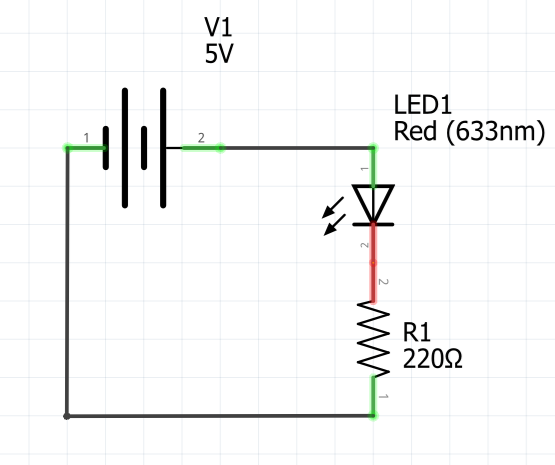
This images shows a simple circuit, note how it is completed
Simplify the circuit.
For example, if trying to light an LED take the 3.3V output directly to power the LED instead of from a GPIO.If it doesn’t light then trouble shoot. Check the LED is the right way around, check everything is inserted correctly etc…
Simplify the code.
Make simple version of the code to check it interacts with the circuit correctly. Build back up the complexity